
Upload a video, get a video back. Choose MP3 or WAV output. Hit your exact loudness target. All in one step — no extra software needed.
We’ve been busy behind the scenes at Audyllic, and we’re delighted to announce a major update to the portal at portal.audyllic.com! These new features have been designed to give you more control over your output, support a wider range of file types, and make the whole process even simpler, without changing anything about the core Optimod processing that you already trust.
Here is everything that is new.
Video File Processing
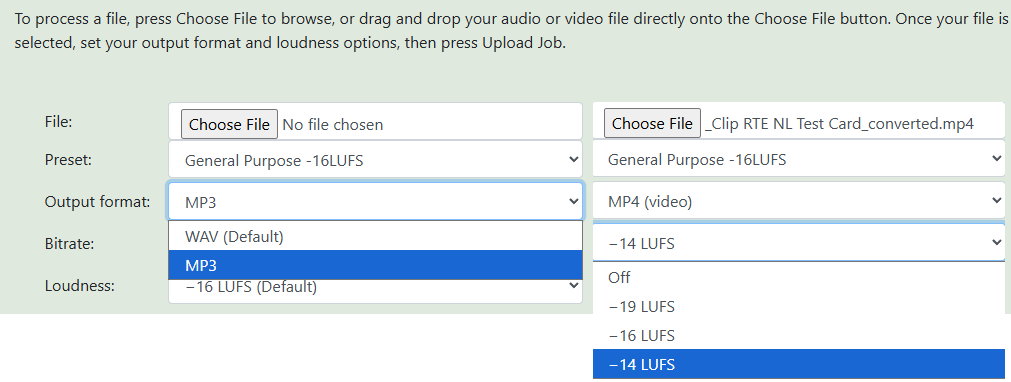
You can now upload MP4 video files directly to the Audyllic portal. This is ideal for video podcasts, interview recordings, corporate videos, eLearning content, or any video where the audio needs the Optimod treatment.
When you upload a video file, Audyllic automatically extracts the audio track, processes it through the Optimod, and returns a finished MP4 file with the newly processed audio track seamlessly replaced – the video itself is untouched. There is nothing extra to do. Upload your video, choose your settings, and download a finished file.
Free accounts can upload video files up to 100MB. Accounts with purchased credits can upload up to 200MB. For longer or higher-resolution video files, the SmartWatch Folder desktop app (see below) handles files of any size.
MP3 Output
Until now, Audyllic always returned your processed file as a WAV. That is still the default and remains the best choice for maximum quality, but you can now choose to receive your processed file as an MP3 instead.
When selecting MP3 output, you can choose from three bitrates:
- 128 kbps – smallest file size, suitable for speech-only content
- 192 kbps – the recommended choice for most podcasts and mixed speech/music content
- 256 kbps – high quality, ideal for music-heavy content
No need to run a separate conversion step after downloading. The portal handles it all in one go.
Loudness Normalisation
This is one of the most requested additions to the portal. After the Optimod processes your audio, you can now apply a final whole-file loudness normalisation to hit a specific target level — ensuring your content meets the requirements of whichever platform you are publishing to.
The available targets are:
- -19 LUFS – Recommended for true (single track) mono content or single-speaker playback on one speaker, for dual mono, use -16LUFs
- -16 LUFS – Apple Podcasts standard, and the most widely used target for podcasting
- -14 LUFS – Spotify and YouTube standard, recommended for video content
Loudness normalisation is applied after the Optimod, as a simple whole-file gain adjustment. It does not touch the dynamic processing or the character of the Optimod output — it simply raises or lowers the overall level to hit the target. A true peak limiter with a -1.5 dBTP ceiling is applied automatically to prevent any possibility of digital clipping, regardless of the target chosen.
If you prefer to leave the level exactly as the Optimod produces it, simply leave normalisation set to Off. This remains the default.
A note on audiobooks and ACX: Processing your audiobook through Audyllic at -16 LUFS will produce files that measure between -18 and -23 RMS, which meets the ACX submission standard for Audible. You can verify this at ACX Lab before submitting.
Improved Mono File Handling
If you upload a mono audio file, Audyllic now automatically detects this and handles it correctly. Mono files are temporarily converted to dual-mono stereo before being sent to the Optimod — this ensures the Optimod’s AGC and processing behaves correctly, as it is optimised for stereo signals.
When your processed file is returned, you can choose how you want it delivered:
- Return as stereo (dual mono) – both channels carry identical audio in a stereo container. This is the recommended setting for podcast distribution. The reason is a subtle but important one: the ITU-R BS1770 loudness standard treats mono files as playing on one speaker and stereo files as playing on two. In practice, most playback devices — phones, earphones, smart speakers play both mono and stereo files on two channels without adjusting loudness. Returning your file as stereo (dual mono) ensures the perceived loudness is consistent with other stereo podcast content.
- Return as true mono – a single-channel file, smaller in size. Choose this if you specifically need a mono file for your workflow.
-
Output Format Shown on Your Jobs List
Your jobs list now shows the output format for each job: WAV, 192k MP3, MP4, and so on, so you always know at a glance what you will be downloading before you click. The upload date and time is also now shown for each job, making it easier to track your processing history.
-
Want More? The SmartWatch Folder App
All of the features described above are available in the portal. but if you work with longer files, higher volumes of content, or want even greater control, the SmartWatch Folder desktop app gives you everything the portal offers and more.
Available for both Windows and macOS, the SmartWatch Folder app works by monitoring a folder on your computer. Drop a file in, and it is automatically uploaded to Audyllic, processed through the Optimod, and the finished file is downloaded back to your chosen folder, with no need to open a browser or click anything.
Additional features in the SmartWatch Folder app include:
- Support for video files of any length and size (no portal upload limit)
- Additional loudness targets including -18 dBRMS for ACX/Audible compliance
- Batch processing of multiple files simultaneously
- Full control over mono handling and output format
- Automatic file organisation on completion
- Automatic background noise reduction option
Download the SmartWatch Folder app free from the Downloads section of the Audyllic website. A full user manual is included.
These updates are live now at portal.audyllic.com. Log in to try them with your existing account, or register free to get started with 35 minutes of free processing time per month.
As always, if you have any questions or feedback, we would love to hear from you via our Contact page.
The Audyllic Team